1. Overview
Evertec Unified API (EVUAPI) is a Charge Anywhere cloud integration service created for Evertec payment workflows. It provides a consistent API for a merchant application to submit payment transactions, track their progress, and retrieve their final result while keeping terminal-specific communication and processor interaction behind the EVUAPI boundary.
EVUAPI supports two fundamentally different execution models. Card-not-present transactions use a payment token and normally complete within the create request. Card-present transactions require a physical terminal and therefore progress asynchronously across a terminal agent, an Evertec payment application, and the processor.
| Operation | Method and path | Use |
|---|---|---|
| API Health | GET /api/v1/health | Check service readiness. |
| CNP Transaction | POST /api/v1/transactions | Submit a token-based Credit Sale, PreAuth/AuthOnly, Force, Return, or Void. |
| CP Transaction | POST /api/v1/transactions | Submit a supported transaction to the configured physical terminal. |
| CP Close Batch | POST /api/v1/transactions | Close/settle the current terminal batch using transactionType=12. |
| Transaction Status | GET /api/v1/transactions/{RequestId} | Retrieve the current or final result by RequestId. |
2. Getting started
2.1 Base URL and transport
Send requests over HTTPS to the base URL assigned for the target environment.
{{BaseUrl}}/api/v1/...BaseURL: https://webtest.chargeanywhere.com/evuapi
- Keep test and production base URLs in separate environment configurations.
- Use application/json for request and response bodies.
- Apply connection, read, and overall workflow deadlines appropriate to the merchant application.
2.2 Customer identity headers
Transaction requests and status retrieval use the following identity headers. The header values must represent the same merchant-terminal relationship as the corresponding JSON fields.
| Header | Required | Description |
| Accept: application/json | Recommended | Requests a JSON representation. |
| Content-Type: application/json | POST only | Declares a JSON request body. |
| X-Merchant-Id | Yes | Merchant identifier issued for the integration. |
| X-Terminal-Id | Yes | Merchant terminal identifier; preserve leading zeros. |
| X-Identification | Yes | Configured terminal/device identification value. |
| Do not hard-code: Store environment values in a secret manager or private runtime configuration. Do not publish them in documentation, source code, screenshots, logs, or shared collections. |
2.3 First integration sequence
| Step | Action |
| 1 | Call API Health and confirm the service is ready. |
| 2 | Submit either a CNP or CP sale. |
| 3 | Persist requestId with the merchant invoice or order. |
| 4 | If completed=false or the outcome is uncertain, retrieve transaction status. |
| 5 | Persist the final response for reconciliation. |
3. Transaction model
3.1 CNP and CP
Card not present (CNP). The merchant sends a payment token with cardPresent=false. Processing normally returns a final approval or decline in the create response.
Card present (CP). The merchant sends cardPresent=true. A physical terminal completes the cardholder interaction, so the initial response can be non-final and the merchant retrieves status until completion.
3.2 Transaction types
| Transaction Type | Value |
| SALE | 1 |
| VOID | 2 |
| RETURN | 3 |
| FORCE | 4 |
| AUTH_ONLY | 6 |
| CLOSE_BATCH | 12 |
Follow-up transaction relationship
Force, Return, Void, and Reversal can carry original-transaction context using:
originalAmountoriginalApprovalCodeoriginalGatewayReferenceNumber
A Void (transactionType=2) has an additional rule: send the exact same transactionHash returned by the transaction being voided. EVUAPI may generate a new transactionHash for non-Void transactions when the caller does not provide one. Force and Return do not reuse the original transaction hash.
3.3 RequestId and completion
| Field | Meaning | Developer rule |
|---|---|---|
| requestId | EVUAPI tracking identifier for one transaction. | Persist it immediately and use it for status retrieval. |
| transactionHash | Charge Anywhere transaction hash. | Persist it. Reuse the exact value only when submitting a Void for that transaction. |
| status | Current business-processing state. | Do not treat an intermediate state as approval. |
| completed | Whether the transaction has reached a final state. | Continue recovery/status handling while false. |
| timeOut | Wait/receive timeout whose behavior depends on CNP versus CP. | Do not interpret expiration of the HTTP wait as cancellation of a CP terminal transaction. |
3.4 Transaction statuses
| Status | Final? | Customer interpretation |
|---|---|---|
| Pending | No | EVUAPI persisted the CP request and terminal dispatch is pending/queued. |
| SentToTerminal | No | The CP request was accepted for delivery to the configured terminal. |
| ReceivedByTerminal | No | The terminal acknowledged the request. |
| Processing | No | Cardholder/payment processing is in progress. |
| Approved | Yes | The transaction was approved; verify completed=true. |
| Declined | Yes | The processor declined the transaction; verify completed=true. |
| Failed | Yes | Processing could not complete successfully. |
| TimedOut | Yes | The terminal workflow reached its processing deadline. |
| Cancelled | Yes | The transaction was cancelled before approval. |
4. Customer workflows
4.1 CNP sale workflow
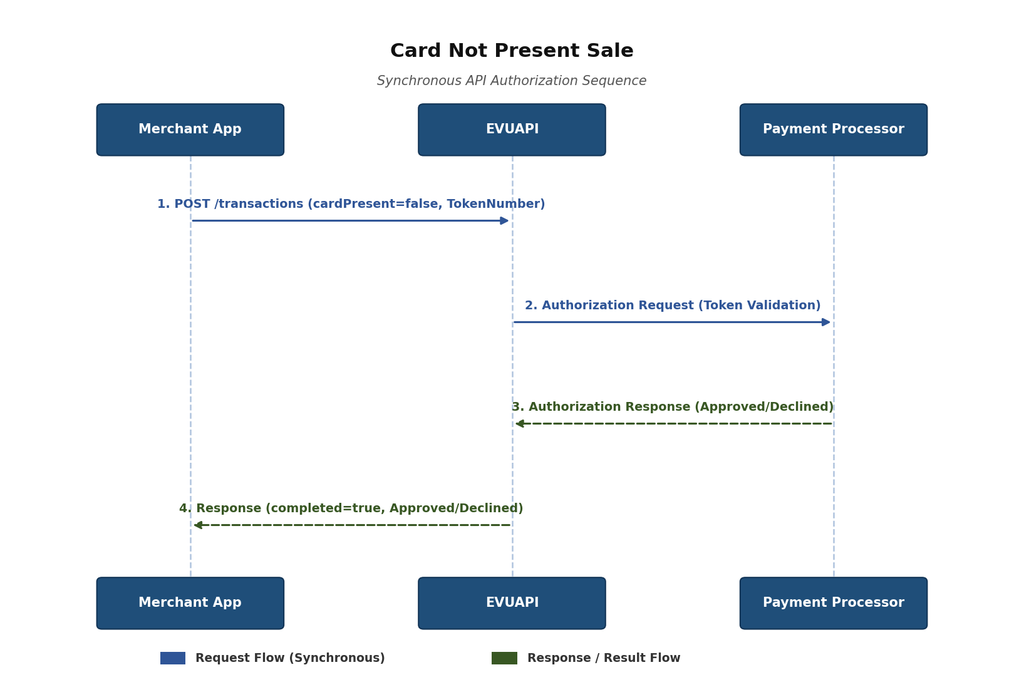
Figure 1. A token-based CNP sale normally returns its final result in the create response.
- Send cardPresent=false and a valid tokenNumber.
- Persist requestId even when a final result is returned.
- Use transaction status if the create response is missing, non-final, or uncertain.
4.2 CP sale workflow
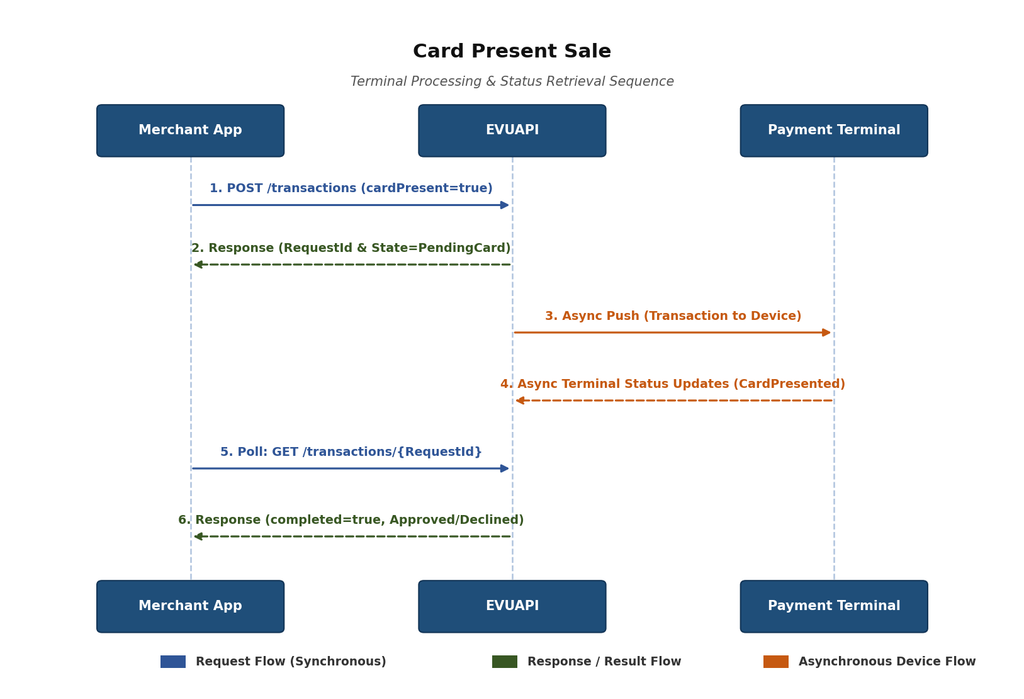
Figure 2. A CP sale can return an intermediate state; the merchant retrieves status by RequestId. A configured terminal is required to complete an end-to-end CP test.
5. Common transaction contracts
5.1 Create-transaction request fields
CNP and CP use the same request model. The requirement changes for tokenNumber, cardPresent, and the expected handling of timeOut.
| Field | Type | CNP | CP | Description |
| merchantId | string | Required | Required | Merchant identifier; must match X-Merchant-Id. |
| identification | string | Required | Required | Configured terminal/device identity; must match X-Identification. |
| terminalId | string | Required | Required | Merchant terminal ID; must match X-Terminal-Id and preserve leading zeros. |
| terminalDateTime | datetime | Required | Required | Initiator local date/time in YYYY-MM-DDTHH:mm:ss form. |
| paymentType | integer | Required | Required | Type of payment method used. |
| transactionType | integer | Required | Required | Type of transaction. |
| cardPresent | boolean | false | true | Selects token processing or physical-terminal processing. |
| tokenNumber | string | Required | Empty | Payment token for CNP. Treat as sensitive. |
| fullName | string | Optional | Optional | Customer/cardholder display name. |
| customerNumber | string | Optional | Optional | Merchant customer reference. |
| clerkNumber | string | Optional | Optional | Cashier or clerk reference. |
| clerkName | string | Optional | Optional | Cashier or clerk display name. |
| invoiceNumber | string | Recommended | Recommended | Unique merchant correlation value for the sale. |
| amountOfSale | decimal | Required | Required | Base sale amount before tax, tips, cashback, and fee. |
| tax | decimal | Calculated | Calculated | Total tax amount. |
| baseStateTax | decimal | Optional | Optional | Taxable base for applicable state/city taxes. |
| baseReducedTax | decimal | Optional | Optional | Taxable base for reduced tax. |
| stateTax | decimal | Optional | Optional | State tax amount. |
| cityTax | decimal | Optional | Optional | Municipal/city tax amount. |
| reducedTax | decimal | Optional | Optional | Reduced-rate tax amount. |
| subTotal | decimal | Calculated | Calculated | For a sale, set equal to amountOfSale before tax, tips, cashback, and fee. |
| tips | decimal | Optional | Optional | Tip or gratuity amount. |
| cashBack | decimal | Optional | Optional | Cashback amount. |
| fee | decimal | Optional | Optional | Additional fee amount. |
| grandTotal | decimal | Calculated | Calculated | subTotal + tax + tips + cashBack + fee. |
| originalAmount | decimal | 0 for sale | 0 for sale | Reserved for an operation referring to a prior transaction. |
| originalGatewayReferenceNumber | string | Empty | Empty | Reserved reference to a prior transaction. |
| appVersion | string | Recommended | Recommended | Calling-application version for support and compatibility. |
| timeOut | integer | Optional | Optional | Maximum milliseconds to wait before returning the latest state; does not cancel processing. |
| Money: Use fixed-precision decimal arithmetic. Before sending, validate grandTotal = subTotal + tax + tips + cashBack + fee and tax = stateTax + cityTax + reducedTax when those components are supplied. |
5.2 Transaction response fields
| Field | Type | Description |
|---|---|---|
| requestId | string | EVUAPI correlation ID. Persist immediately. |
| transactionHash | string/null | Charge Anywhere transaction hash. Persist it; a later Void must reuse the exact value. |
| status | string | Current transaction lifecycle state. |
| completed | boolean | true only when the state/result is final. |
| message | string/null | Human-readable status or error message when available. |
| responseCode | string/null | Gateway/application response code; preserve leading zeros. |
| processorResponseCode | string/null | Processor-specific response code; preserve leading zeros. |
| responseText | string/null | Human-readable processor or application result. |
| EvertecResponse | object/null | Processor-specific response container. CP contains the raw App2/Evertec final JSON; CNP is normalized into the known Evertec-compatible structure. |
| approvalCode | string/null | Approval reference when approved. |
| gatewayReferenceNumber | string/null | Gateway transaction reference when available. |
| authorizedAmount | decimal/null | Amount authorized by the processor. |
| tokenNumber | string/null | Returned payment token when available; treat as sensitive. |
| cardType | string/null | Card brand or type when available. |
| statusUrl | string/null | Relative status-retrieval URL when returned. |
| errorId | string/null | Support correlation identifier when returned. |
6. API reference
6.1 Get API Health
| Attribute | Specification |
| Method | GET |
| Path | /api/v1/health |
| Audience | Merchant applications and monitoring systems |
| Authentication | None for this endpoint; environment network controls may still apply |
| Purpose | Confirm EVUAPI readiness before sending transactions. |
No request body is required. Send Accept: application/json.
GET {{BaseUrl}}/api/v1/health
Accept: application/json| HTTP status | Meaning |
| 200 | EVUAPI reports a healthy/ready state. |
| 503 | EVUAPI is reachable but one or more required dependencies are degraded. |
{
  "status": "Healthy",
  "message": "EVUAPI is ready."
}| Usage: Use health for readiness and monitoring. Do not use it as evidence that a specific payment will be approved. |
6.2 CNP Tranasctions
| Attribute | Specification |
| Method | POST |
| Path | /api/v1/transactions |
| Audience | Merchant/POS or ecommerce application |
| Authentication | X-Merchant-Id, X-Terminal-Id, X-Identification |
| Purpose | Submit a token-based card-not-present sale. |
| CNP discriminator | Required value |
| cardPresent | false |
| tokenNumber | A valid payment token |
| transactionType | 1 for a Sale request |
| paymentType | 2 for the documented |
6.2.1 CNP Sale Request example
POST {{BaseUrl}}/api/v1/transactions
Content-Type: application/json
Accept: application/json
X-Merchant-Id: {{MerchantId}}
X-Terminal-Id: {{TerminalId}}
X-Identification: {{Identification}}

{
  "merchantId": "{{MerchantId}}",
  "identification": "{{Identification}}",
  "terminalId": "{{TerminalId}}",
  "terminalDateTime": "2026-09-03T14:30:00",
  "paymentType": 2,
  "transactionType": 1,
  "cardPresent": false,
  "tokenNumber": "TOKEN_REDACTED",
  "invoiceNumber": "INV-20260903-0001",
  "amountOfSale": 25.00,
  "tax": 2.88,
  "stateTax": 2.63,
  "cityTax": 0.25,
  "reducedTax": 0.00,
  "subTotal": 25.00,
  "tips": 0.00,
  "cashBack": 0.00,
  "fee": 0.00,
  "grandTotal": 27.88,
  "originalAmount": 0.00,
  "originalGatewayReferenceNumber": "",
  "appVersion": "1.0.0",
  "timeOut": 30000
}
A CNP create response normally contains the final Approved or Declined result with completed=true. Persist requestId regardless of outcome. If the response is missing or non-final, use Get Transaction Status before deciding whether another payment attempt is appropriate.
6.2.2 CNP PreAuth / AuthOnly Request example
Use transactionType=6 to authorize funds without completing the sale. In the CNP ComsGate mapping, this operation is serialized as Auth Only.
{
  "merchantId": "{{MerchantId}}",
  "identification": "{{Identification}}",
  "terminalId": "{{TerminalId}}",
  "terminalDateTime": "2026-09-10T14:30:00",
  "paymentType": 2,
  "transactionType": 6,
  "cardPresent": false,
  "tokenNumber": "{{TokenNumber}}",
  "invoiceNumber": "INV-CNP-PREAUTH",
  "amountOfSale": {{AmountOfSale}},
  "tax": {{Tax}},
  "baseStateTax": {{BaseStateTax}},
  "baseReducedTax": {{BaseReducedTax}},
  "stateTax": {{StateTax}},
  "cityTax": {{CityTax}},
  "reducedTax": {{ReducedTax}},
  "subTotal": {{SubTotal}},
  "tips": {{Tips}},
  "cashBack": {{CashBack}},
  "fee": {{Fee}},
  "grandTotal": {{GrandTotal}},
  "originalAmount": 0.0,
  "originalGatewayReferenceNumber": "",
  "appVersion": "{{AppVersion}}",
  "timeOut": 30000
}
6.2.3 CNP Force / PreAuth Completion Request example
Use transactionType=4 to complete a prior PreAuth/AuthOnly. Supply the original authorization context.
{
  "merchantId": "{{MerchantId}}",
  "identification": "{{Identification}}",
  "terminalId": "{{TerminalId}}",
  "terminalDateTime": "2026-09-10T14:30:00",
  "paymentType": 2,
  "transactionType": 4,
  "cardPresent": false,
  "tokenNumber": "{{TokenNumber}}",
  "invoiceNumber": "INV-CNP-FORCE",
  "amountOfSale": {{AmountOfSale}},
  "tax": {{Tax}},
  "baseStateTax": {{BaseStateTax}},
  "baseReducedTax": {{BaseReducedTax}},
  "stateTax": {{StateTax}},
  "cityTax": {{CityTax}},
  "reducedTax": {{ReducedTax}},
  "subTotal": {{SubTotal}},
  "tips": {{Tips}},
  "cashBack": {{CashBack}},
  "fee": {{Fee}},
  "grandTotal": {{GrandTotal}},
  "originalAmount": {{OriginalAmount}},
  "originalApprovalCode": "{{OriginalApprovalCode}}",
  "originalGatewayReferenceNumber": "{{OriginalGatewayReferenceNumber}}",
  "appVersion": "{{AppVersion}}",
  "timeOut": 30000
}
6.2.4 CNP Return Request example
Use transactionType=3 to process a return/refund. When the Return references a previous transaction, supply its original authorization context.
{
  "merchantId": "{{MerchantId}}",
  "identification": "{{Identification}}",
  "terminalId": "{{TerminalId}}",
  "terminalDateTime": "2026-09-10T14:30:00",
  "paymentType": 2,
  "transactionType": 3,
  "cardPresent": false,
  "tokenNumber": "{{TokenNumber}}",
  "invoiceNumber": "INV-CNP-RETURN",
  "amountOfSale": {{AmountOfSale}},
  "tax": {{Tax}},
  "baseStateTax": {{BaseStateTax}},
  "baseReducedTax": {{BaseReducedTax}},
  "stateTax": {{StateTax}},
  "cityTax": {{CityTax}},
  "reducedTax": {{ReducedTax}},
  "subTotal": {{SubTotal}},
  "tips": {{Tips}},
  "cashBack": {{CashBack}},
  "fee": {{Fee}},
  "grandTotal": {{GrandTotal}},
  "originalAmount": {{OriginalAmount}},
  "originalApprovalCode": "{{OriginalApprovalCode}}",
  "originalGatewayReferenceNumber": "{{OriginalGatewayReferenceNumber}}",
  "appVersion": "{{AppVersion}}",
  "timeOut": 30000
}
6.2.5 CNP Void Request example
Use transactionType=2 to void a prior transaction.
A Void must send:
- the original
originalAmount - the original
originalApprovalCode - the original
originalGatewayReferenceNumber - the exact same
transactionHashreturned by the transaction being voided
{
  "merchantId": "{{MerchantId}}",
  "identification": "{{Identification}}",
  "terminalId": "{{TerminalId}}",
  "terminalDateTime": "2026-09-10T14:30:00",
  "paymentType": 2,
  "transactionType": 2,
  "transactionHash": "{{TransactionHash}}",
  "cardPresent": false,
  "tokenNumber": "{{TokenNumber}}",
  "invoiceNumber": "INV-CNP-VOID",
  "amountOfSale": {{AmountOfSale}},
  "tax": {{Tax}},
  "baseStateTax": {{BaseStateTax}},
  "baseReducedTax": {{BaseReducedTax}},
  "stateTax": {{StateTax}},
  "cityTax": {{CityTax}},
  "reducedTax": {{ReducedTax}},
  "subTotal": {{SubTotal}},
  "tips": {{Tips}},
  "cashBack": {{CashBack}},
  "fee": {{Fee}},
  "grandTotal": {{GrandTotal}},
  "originalAmount": {{OriginalAmount}},
  "originalApprovalCode": "{{OriginalApprovalCode}}",
  "originalGatewayReferenceNumber": "{{OriginalGatewayReferenceNumber}}",
  "appVersion": "{{AppVersion}}",
  "timeOut": 30000
}
EVUAPI rejects a Void when the required transaction hash is missing.
6.3 CP Transactions
| Attribute | Specification |
| Method | POST |
| Path | /api/v1/transactions |
| Audience | Merchant or POS application connected to a configured payment terminal |
| Authentication | X-Merchant-Id, X-Terminal-Id, X-Identification |
| Purpose | Start a card-present sale on the configured physical terminal. |
| CP discriminator | Required value |
| cardPresent | true |
| tokenNumber | Empty string or omitted as agreed for the integration |
| transactionType | 1 for a Sale request |
| paymentType | 2 for credit tender type |
6.3.1 timeOut behavior
| Value | Behavior | Required client action |
| 0 | Return the current state immediately after the CP request is accepted. | Persist requestId and begin status retrieval when completed=false. |
| 30000 | Wait for up to 30 seconds for a later state or final result. | If completed=false when returned, continue status retrieval. |
| Important: timeOut controls how long the HTTP request waits. It does not cancel the terminal transaction and does not guarantee completion within that period. |
6.3.2 CP Sale Request example
POST {{BaseUrl}}/api/v1/transactions
Content-Type: application/json
Accept: application/json
X-Merchant-Id: {{MerchantId}}
X-Terminal-Id: {{TerminalId}}
X-Identification: {{Identification}}

{
  "merchantId": "{{MerchantId}}",
  "identification": "{{Identification}}",
  "terminalId": "{{TerminalId}}",
  "terminalDateTime": "2026-09-03T14:35:00",
  "paymentType": 2,
  "transactionType": 1,
  "cardPresent": true,
  "tokenNumber": "",
  "invoiceNumber": "INV-20260903-0002",
  "amountOfSale": 25.00,
  "tax": 2.88,
  "stateTax": 2.63,
  "cityTax": 0.25,
  "reducedTax": 0.00,
  "subTotal": 25.00,
  "tips": 0.00,
  "cashBack": 0.00,
  "fee": 0.00,
  "grandTotal": 27.88,
  "originalAmount": 0.00,
  "originalGatewayReferenceNumber": "",
  "appVersion": "1.0.0",
  "timeOut": 0
}
The response may be intermediate or final. When completed=false, processor fields can be null and the merchant application must continue with Get Transaction Status. Do not create another sale solely because the first response is pending.
6.3.3 CP PreAuth / AuthOnly
Use transactionType=6 to request authorization without completing the sale.
{
  "merchantId": "{{MerchantId}}",
  "identification": "{{Identification}}",
  "terminalId": "{{TerminalId}}",
  "terminalDateTime": "2026-09-10T14:35:00",
  "paymentType": 2,
  "transactionType": 6,
  "cardPresent": true,
  "tokenNumber": "",
  "invoiceNumber": "INV-CP-PREAUTH",
  "amountOfSale": {{AmountOfSale}},
  "tax": {{Tax}},
  "baseStateTax": {{BaseStateTax}},
  "baseReducedTax": {{BaseReducedTax}},
  "stateTax": {{StateTax}},
  "cityTax": {{CityTax}},
  "reducedTax": {{ReducedTax}},
  "subTotal": {{SubTotal}},
  "tips": {{Tips}},
  "cashBack": {{CashBack}},
  "fee": {{Fee}},
  "grandTotal": {{GrandTotal}},
  "originalAmount": 0.0,
  "originalGatewayReferenceNumber": "",
  "appVersion": "{{AppVersion}}",
  "timeOut": 30000
}
6.3.4 CP Force / PreAuth Completion
Use transactionType=4 to complete a prior CP PreAuth/AuthOnly and send the original authorization context.
{
  "merchantId": "{{MerchantId}}",
  "identification": "{{Identification}}",
  "terminalId": "{{TerminalId}}",
  "terminalDateTime": "2026-09-10T14:35:00",
  "paymentType": 2,
  "transactionType": 4,
  "cardPresent": true,
  "tokenNumber": "",
  "invoiceNumber": "INV-CP-FORCE",
  "amountOfSale": {{AmountOfSale}},
  "tax": {{Tax}},
  "baseStateTax": {{BaseStateTax}},
  "baseReducedTax": {{BaseReducedTax}},
  "stateTax": {{StateTax}},
  "cityTax": {{CityTax}},
  "reducedTax": {{ReducedTax}},
  "subTotal": {{SubTotal}},
  "tips": {{Tips}},
  "cashBack": {{CashBack}},
  "fee": {{Fee}},
  "grandTotal": {{GrandTotal}},
  "originalAmount": {{OriginalAmount}},
  "originalApprovalCode": "{{OriginalApprovalCode}}",
  "originalGatewayReferenceNumber": "{{OriginalGatewayReferenceNumber}}",
  "appVersion": "{{AppVersion}}",
  "timeOut": 30000
}
6.3.5 CP Return
Use transactionType=3 for a card-present return/refund. When it references a prior transaction, send the original authorization context.
{
  "merchantId": "{{MerchantId}}",
  "identification": "{{Identification}}",
  "terminalId": "{{TerminalId}}",
  "terminalDateTime": "2026-09-10T14:35:00",
  "paymentType": 2,
  "transactionType": 3,
  "cardPresent": true,
  "tokenNumber": "",
  "invoiceNumber": "INV-CP-RETURN",
  "amountOfSale": {{AmountOfSale}},
  "tax": {{Tax}},
  "baseStateTax": {{BaseStateTax}},
  "baseReducedTax": {{BaseReducedTax}},
  "stateTax": {{StateTax}},
  "cityTax": {{CityTax}},
  "reducedTax": {{ReducedTax}},
  "subTotal": {{SubTotal}},
  "tips": {{Tips}},
  "cashBack": {{CashBack}},
  "fee": {{Fee}},
  "grandTotal": {{GrandTotal}},
  "originalAmount": {{OriginalAmount}},
  "originalApprovalCode": "{{OriginalApprovalCode}}",
  "originalGatewayReferenceNumber": "{{OriginalGatewayReferenceNumber}}",
  "appVersion": "{{AppVersion}}",
  "timeOut": 30000
}
6.3.6 CP Void / Reversal
Use transactionType=2 for Void or transactionType=11 for Reversal.
For Void, reuse the exact transactionHash from the transaction being voided.
{
  "merchantId": "{{MerchantId}}",
  "identification": "{{Identification}}",
  "terminalId": "{{TerminalId}}",
  "terminalDateTime": "2026-09-10T14:35:00",
  "paymentType": 2,
  "transactionType": {{OriginalTransactionType}},
  "transactionHash": "{{TransactionHash}}",
  "cardPresent": true,
  "tokenNumber": "",
  "invoiceNumber": "INV-CP-VOID-REVERSAL",
  "amountOfSale": {{AmountOfSale}},
  "tax": {{Tax}},
  "baseStateTax": {{BaseStateTax}},
  "baseReducedTax": {{BaseReducedTax}},
  "stateTax": {{StateTax}},
  "cityTax": {{CityTax}},
  "reducedTax": {{ReducedTax}},
  "subTotal": {{SubTotal}},
  "tips": {{Tips}},
  "cashBack": {{CashBack}},
  "fee": {{Fee}},
  "grandTotal": {{GrandTotal}},
  "originalAmount": {{OriginalAmount}},
  "originalApprovalCode": "{{OriginalApprovalCode}}",
  "originalGatewayReferenceNumber": "{{OriginalGatewayReferenceNumber}}",
  "appVersion": "{{AppVersion}}",
  "timeOut": 30000
}
6.3.7 CP Cash Sale
Use paymentType=5, transactionType=1, and cardPresent=true to submit a Cash sale through the terminal path. Sale does not include original-transaction fields.
{

  "merchantId": "{{MerchantId}}",

  "identification": "{{Identification}}",

  "terminalId": "{{TerminalId}}",

  "terminalDateTime": "2026-08-14T18:30:00",

  "paymentType": 5,

  "transactionType": 1,

  "stationNumber": {{StationNumber}},

  "cashierId": {{CashierId}},

  "cardPresent": true,

  "tokenNumber": "",

  "fullName": "John Smith",

  "amountOfSale": {{AmountOfSale}},

  "tax": {{Tax}},

  "baseStateTax": {{BaseStateTax}},

  "baseReducedTax": {{BaseReducedTax}},

  "stateTax": {{StateTax}},

  "cityTax": {{CityTax}},

  "reducedTax": {{ReducedTax}},

  "subTotal": {{SubTotal}},

  "tips": {{Tips}},

  "cashBack": {{CashBack}},

  "fee": {{Fee}},

  "grandTotal": {{GrandTotal}},

  "appVersion": "{{AppVersion}}",

  "timeOut": 30000

}
6.3.8 CP Cash Return
Use paymentType=5, transactionType=3, and cardPresent=true for a Cash return/refund through the terminal path. The collection includes original-transaction fields for a linked Return.
{

  "merchantId": "{{MerchantId}}",

  "identification": "{{Identification}}",

  "terminalId": "{{TerminalId}}",

  "terminalDateTime": "2026-08-14T18:30:00",

  "paymentType": 5,

  "transactionType": 3,

  "stationNumber": {{StationNumber}},

  "cashierId": {{CashierId}},

  "cardPresent": true,

  "tokenNumber": "",

  "fullName": "John Smith",

  "amountOfSale": {{AmountOfSale}},

  "tax": {{Tax}},

  "baseStateTax": {{BaseStateTax}},

  "baseReducedTax": {{BaseReducedTax}},

  "stateTax": {{StateTax}},

  "cityTax": {{CityTax}},

  "reducedTax": {{ReducedTax}},

  "subTotal": {{SubTotal}},

  "tips": {{Tips}},

  "cashBack": {{CashBack}},

  "fee": {{Fee}},

  "grandTotal": {{GrandTotal}},

  "originalAmount": {{OriginalAmount}},

  "originalApprovalCode": "{{OriginalApprovalCode}}",

  "originalGatewayReferenceNumber": "{{OriginalGatewayReferenceNumber}}",

  "appVersion": "{{AppVersion}}",

  "timeOut": 30000

}
6.3.9 CP ATH Movil Sale
Use paymentType=13, transactionType=1, and cardPresent=true for an ATH Movil sale through the terminal path. Sale does not include original-transaction fields.
{

  "merchantId": "{{MerchantId}}",

  "identification": "{{Identification}}",

  "terminalId": "{{TerminalId}}",

  "terminalDateTime": "2026-08-14T18:30:00",

  "paymentType": 13,

  "transactionType": 1,

  "stationNumber": {{StationNumber}},

  "cashierId": {{CashierId}},

  "cardPresent": true,

  "tokenNumber": "",

  "fullName": "John Smith",

  "amountOfSale": {{AmountOfSale}},

  "tax": {{Tax}},

  "baseStateTax": {{BaseStateTax}},

  "baseReducedTax": {{BaseReducedTax}},

  "stateTax": {{StateTax}},

  "cityTax": {{CityTax}},

  "reducedTax": {{ReducedTax}},

  "subTotal": {{SubTotal}},

  "tips": {{Tips}},

  "cashBack": {{CashBack}},

  "fee": {{Fee}},

  "grandTotal": {{GrandTotal}},

  "appVersion": "{{AppVersion}}",

  "timeOut": 30000

}
6.3.10 CP ATH Movil Return
Use paymentType=13, transactionType=3, and cardPresent=true for an ATH Movil return/refund through the terminal path. The collection includes original-transaction fields for a linked Return.
{

  "merchantId": "{{MerchantId}}",

  "identification": "{{Identification}}",

  "terminalId": "{{TerminalId}}",

  "terminalDateTime": "2026-08-14T18:30:00",

  "paymentType": 13,

  "transactionType": 3,

  "stationNumber": {{StationNumber}},

  "cashierId": {{CashierId}},

  "cardPresent": true,

  "tokenNumber": "",

  "fullName": "John Smith",

  "amountOfSale": {{AmountOfSale}},

  "tax": {{Tax}},

  "baseStateTax": {{BaseStateTax}},

  "baseReducedTax": {{BaseReducedTax}},

  "stateTax": {{StateTax}},

  "cityTax": {{CityTax}},

  "reducedTax": {{ReducedTax}},

  "subTotal": {{SubTotal}},

  "tips": {{Tips}},

  "cashBack": {{CashBack}},

  "fee": {{Fee}},

  "grandTotal": {{GrandTotal}},

  "originalAmount": {{OriginalAmount}},

  "originalApprovalCode": "{{OriginalApprovalCode}}",

  "originalGatewayReferenceNumber": "{{OriginalGatewayReferenceNumber}}",

  "appVersion": "{{AppVersion}}",

  "timeOut": 30000

}
6.3.11 CP Close Batch
Use transactionType=12 and cardPresent=true to close/settle the current terminal batch. This is a batch operation, not a tender-specific purchase. The example uses paymentType=2 to satisfy the current positive-paymentType requirement; App1 selects the Close Batch route independently of payment type.
{

  "merchantId": "{{MerchantId}}",

  "identification": "{{Identification}}",

  "terminalId": "{{TerminalId}}",

  "terminalDateTime": "2026-08-14T18:30:00",

  "paymentType": 2,

  "transactionType": 12,

  "stationNumber": {{StationNumber}},

  "cashierId": {{CashierId}},

  "cardPresent": true,

  "tokenNumber": "",

  "amountOfSale": 0.0,

  "tax": 0.0,

  "baseStateTax": 0.0,

  "baseReducedTax": 0.0,

  "stateTax": 0.0,

  "cityTax": 0.0,

  "reducedTax": 0.0,

  "subTotal": 0.0,

  "tips": 0.0,

  "cashBack": 0.0,

  "fee": 0.0,

  "grandTotal": 0.0,

  "appVersion": "{{AppVersion}}",

  "timeOut": 30000

}
All monetary fields in the App3 Close Batch example are literal zero values. Do not include original-transaction fields.
App1 performs its normal App2 logon and sends the settlement request to /startSettle. That internal request contains terminal/station/cashier identity, reference, session_id, receipt_output, and last_reference. It does not send amount, tip, tax, cashback, receipt_email, or manual_entry_indicator fields to /startSettle.
Evertec initially returns approval_code=ST with an internal transaction identifier. App1 polls /getTrxStatus and reports the final result to EVUAPI. App3 retrieves the result through the same Get Transaction Status endpoint used for other CP operations. The internal App2 correlation fields are not exposed in the public EvertecResponse.
6.4 Get Transaction Status
| Attribute | Specification |
| Method | GET |
| Path | /api/v1/transactions/{RequestId} |
| Audience | Merchant/POS or ecommerce application |
| Authentication | Same X-Merchant-Id, X-Terminal-Id, and X-Identification used for creation |
| Purpose | Retrieve the latest state and available result for an existing transaction. |
Path parameters
| Parameter | Type | Required | Description |
|---|---|---|---|
| RequestId | string | Yes | The requestId returned by Create Transaction. |
Query parameters
| Parameter | Required | Description |
|---|---|---|
| merchantId | Yes | Merchant identity used to authorize access to the transaction. |
| terminalId | Yes | Merchant terminal identifier used to authorize access to the transaction. |
| identification | Yes | Physical terminal identity; same logical identity as SerialNumber/ManNumber. |
GET {{BaseUrl}}/api/v1/transactions/{{RequestId}}
Accept: application/json
X-Merchant-Id: {{MerchantId}}
X-Terminal-Id: {{TerminalId}}
X-Identification: {{Identification}}| Observed result | Developer action |
| completed=false | Persist the latest state and poll again using the agreed integration cadence. |
| completed=true | Persist the final response and stop polling. |
| Status request times out | Retry this GET with bounded backoff; do not submit a replacement sale. |
| Transaction not found | Verify environment, RequestId, and merchant-terminal identity before escalating. |
| Polling: Use the polling cadence and rate limits agreed for your integration profile. Do not busy-loop. Apply bounded backoff, jitter, and an overall reconciliation deadline. |
7. Error handling and reconciliation
| Condition | Required handling |
| HTTP success; completed=false | The request was served but the payment is not final. Retrieve status. |
| HTTP success; completed=true | Use status and processor fields to determine the final payment result. |
| Create request times out after requestId was received | Retrieve status; do not create a replacement sale. |
| Create request outcome is unknown | Use invoice/order correlation and status/support procedures before retrying. |
| Status GET fails transiently | Retry the GET with bounded exponential backoff and jitter. |
| Authorization or validation failure | Correct configuration or request data; do not retry unchanged. |
| Service failure | Recheck health, preserve correlation data, and follow the agreed support path. |
7.1 What to retain
- Merchant invoice/order reference and requestId.
- Status transitions and timestamps.
- Final responseCode, processorResponseCode, approvalCode, and gatewayReferenceNumber when present.
- Calling application version and environment name.
| Never log: Payment tokens, live identity-header values, raw credentials, or unnecessary personal data. |
Appendix A. Sanitized response examples
| Examples: Values are sanitized illustrations of the documented response model. |
A.1 Final CNP response
{
  "requestId": "6f6ad0b5-6e6d-4b8e-a863-bcc1b61e5f3a",
  "status": "Approved",
  "completed": true,
  "responseCode": "000",
  "processorResponseCode": "000",
  "responseText": "APPROVED",
  "approvalCode": "ABC123",
  "gatewayReferenceNumber": "00004577564",
  "authorizedAmount": 27.88,
  "tokenNumber": "TOKEN_REDACTED",
  "cardType": "VISA",
  "statusUrl": "/api/v1/transactions/6f6ad0b5-6e6d-4b8e-a863-bcc1b61e5f3a",
  "errorId": null
}
A.2 Intermediate CP response
{
  "requestId": "8c3983f2-e4e7-4f9c-9d41-0a0bbaf8f7e2",
  "status": "SentToTerminal",
  "completed": false,
  "responseCode": null,
  "processorResponseCode": null,
  "responseText": "Transaction accepted for terminal processing.",
  "approvalCode": null,
  "gatewayReferenceNumber": null,
  "authorizedAmount": null,
  "tokenNumber": null,
  "cardType": null,
  "statusUrl": "/api/v1/transactions/8c3983f2-e4e7-4f9c-9d41-0a0bbaf8f7e2",
  "errorId": null
}
A.3 Final status response
{
  "requestId": "8c3983f2-e4e7-4f9c-9d41-0a0bbaf8f7e2",
  "status": "Approved",
  "completed": true,
  "responseCode": "00",
  "processorResponseCode": "00",
  "responseText": "Approved",
  "approvalCode": "DEF456",
  "gatewayReferenceNumber": "987654321",
  "authorizedAmount": 27.88,
  "tokenNumber": "TOKEN_REDACTED",
  "cardType": "VISA",
  "statusUrl": "/api/v1/transactions/8c3983f2-e4e7-4f9c-9d41-0a0bbaf8f7e2",
  "errorId": null
}
Appendix B. Glossary
| Term | Definition |
| CNP | Card not present; a token-based transaction without physical card interaction at a terminal. |
| CP | Card present; a transaction completed through the configured physical payment terminal. |
| EVUAPI | Evertec Unified API customer integration service. |
| RequestId | Correlation identifier used to retrieve the state and result of a transaction. |
| TokenNumber | Sensitive payment token used for a CNP transaction. |
| Identification | Configured terminal/device identification value used in customer requests. |
| completed | Boolean indicating whether a transaction has reached a final state. |
Subscribe to Documentation Updates
Receive a monthly summary of new and updated technical documents.