HOME / Evertec Unified API Integration Specification
Evertec Unified API Integration Specification
6 views0
1. Introduction and scope
1.1 What EVUAPI is
Evertec Unified API (EVUAPI) is a Charge Anywhere cloud integration service created for Evertec payment workflows. It provides a consistent API for a merchant application to submit payment transactions, track their progress, and retrieve their final result while keeping terminal-specific communication and processor interaction behind the EVUAPI boundary.
EVUAPI supports two fundamentally different execution models. Card-not-present transactions use a payment token and normally complete within the create request. Card-present transactions require a physical terminal and therefore progress asynchronously across a terminal agent, an Evertec payment application, and the processor.
1.2 Intended audience
Audience
Primary responsibility
App3 merchant/POS developer
Implements CNP Sale, CP Sale, and Get Transaction Status.
App1 terminal-agent developer
Implements registration, Pushy receipt, local App2 orchestration, polling, and callbacks.
App2/Evertec application team
Provides the local payment workflow consumed by App1.
QA/certification
Exercises success, decline, timeout, identity, retry, and recovery scenarios.
Operations/support
Uses health, error correlation, logs, and reconciliation data.
1.3 Public versus internal API surface
Third-party integrator scope: The merchant/POS integration is centered on POST /api/v1/transactions and GET /api/v1/transactions/{RequestId}. Health is operational. Registration and callbacks belong to App1; diagnostics belong to restricted support tooling.
Surface
Endpoints
Public App3
GET /api/v1/health; POST /api/v1/transactions; GET /api/v1/transactions/{RequestId}
Internal App1
POST /api/v1/terminals/register; POST /api/v1/terminal/transactions/status
Restricted support
GET /api/v1/errors/{ErrorId}
2. Conceptual model
2.1 A simple mental model
EVUAPI can be understood as a transaction coordinator and tracking service. App3 submits work and receives a RequestId. For CP transactions, EVUAPI routes the work to the registered terminal and stores every state reported by App1. App3 asks EVUAPI for the latest state until processing is complete.
Concept
Plain-language meaning
RequestId
Tracking number for one EVUAPI transaction.
PushyToken
Delivery address used by EVUAPI to send CP work to App1.
DeviceToken
App1 bearer credential used when posting terminal status/results.
TokenNumber
Payment token used for CNP processing; not the DeviceToken.
Identification
Physical terminal identity; same logical value as SerialNumber/ManNumber.
TerminalId
Merchant’s identifier for the terminal; separate from physical identification.
2.2 Synchronous and asynchronous
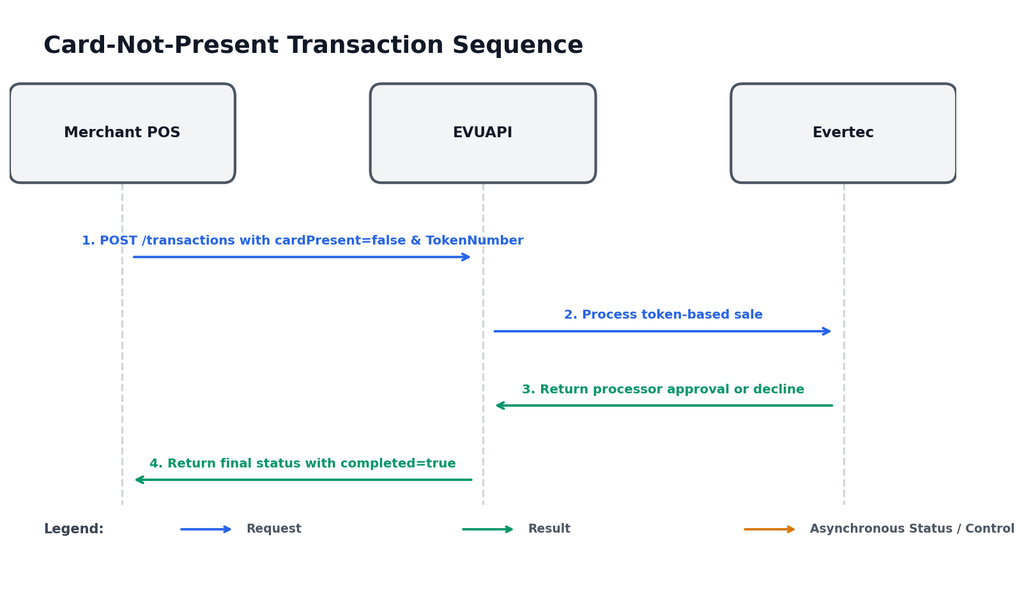
Synchronous CNP: App3 sends a token-based sale and waits for the final processor result in the same interaction.
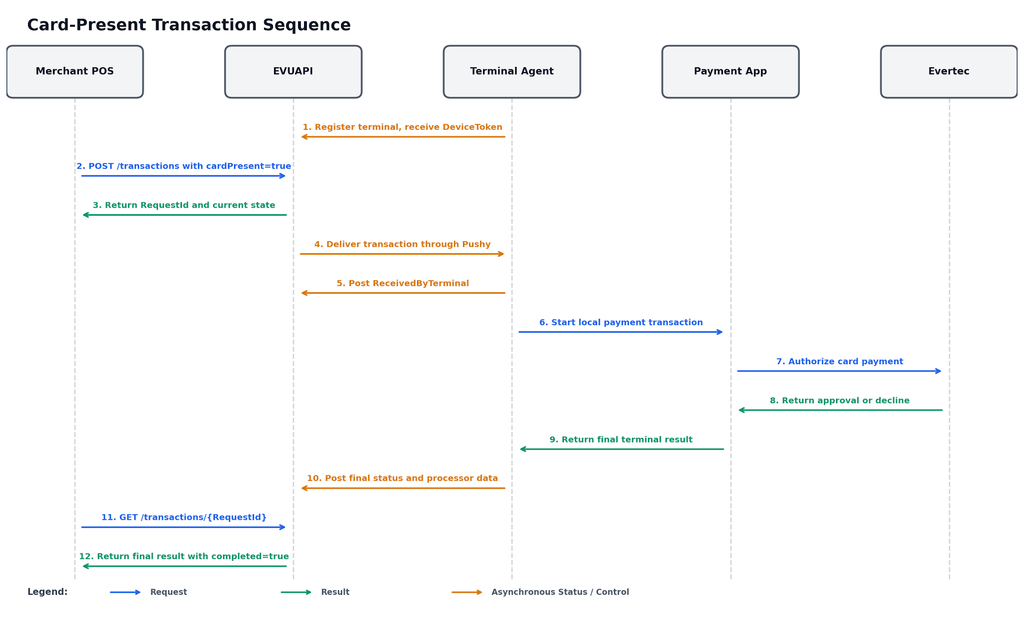
Asynchronous CP: App3 receives a RequestId/current state, the physical terminal processes in the background, and App3 polls until completed=true.
3. Architecture and responsibilities
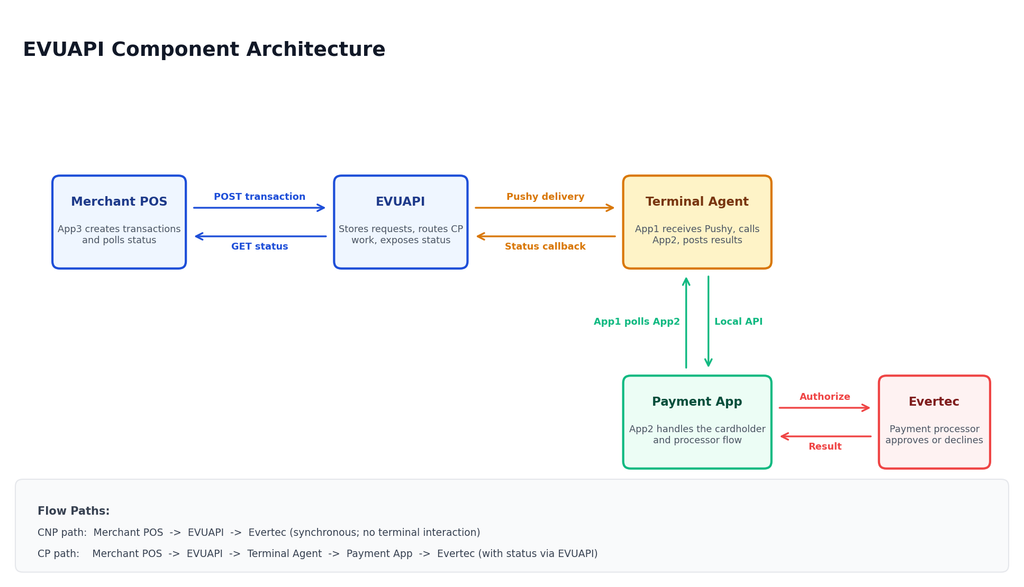
Figure 1. EVUAPI component architecture and primary communication paths.
Component
Responsibilities
App3 – Merchant POS
Creates transactions; persists RequestId; polls status; records final outcome; never manufactures terminal callbacks.
Handles cardholder prompts, EMV/contactless/magnetic/manual interaction, and Evertec processing.
Evertec processor
Approves, declines, or otherwise returns the payment outcome.
ECR relationship: The ECR API collection represents direct/local terminal operations such as logon, startSale, getTrxStatus, and logoff. In the EVUAPI architecture, that complexity is handled between App1 and App2 and is not part of the public App3 contract.
4. Identity, authentication, and security
4.1 Identity relationships
Name
Where used
Meaning
MerchantId
App3 header and transaction body
Merchant relationship
TerminalId
App3 header and transaction body
Merchant terminal ID; preserve leading zeros
Identification
App3 header and transaction body
Physical identity
SerialNumber
App1 registration body
Same logical physical identity as Identification
ManNumber
Terminal inventory/domain model
Same logical physical identity
Consistency rule: MerchantId, TerminalId, and Identification in App3 headers MUST match the corresponding values in the transaction body and the configured merchant-terminal relationship.
4.2 Credential boundaries
Credential
Used by
Classification
Rule
LicenseKey
App1 registration
Sensitive
Provision terminal agent; do not send on normal callbacks.
PushyToken
App1 registration
Sensitive
Route CP notifications to the installed terminal agent.
DeviceToken
App1 callback bearer
Sensitive
Authenticate terminal status and result posts.
TokenNumber
CNP transaction
Payment-sensitive
Process token-based payment; never confuse with DeviceToken.
DiagnosticsApiKey
Restricted diagnostics
Sensitive
Authorize diagnostic lookup when configured.
4.3 Security requirements
Use HTTPS for all non-local EVUAPI traffic.
Keep credentials in a secret manager or Postman Vault/private environment; never embed them in a shareable collection or source repository.
Do not log TokenNumber, DeviceToken, LicenseKey, PushyToken, or diagnostic details.
Log RequestId and ErrorId for correlation, but treat them as operational data.
Confirm production controls beyond identity headers, such as allowlisting, HMAC, mTLS, or another agreed mechanism, during certification.
5. Transaction and status model
5.1 Transaction correlation
Every create response returns a RequestId. App3 MUST persist it with the merchant invoice/order before continuing. The RequestId is the recovery key when the client times out, loses a response, restarts, or needs support. Creating a replacement transaction without first checking the existing RequestId can cause duplicate payment attempts.
5.2 Status lifecycle
Status
Terminal
Meaning
SentToTerminal
No
EVUAPI accepted and dispatched the CP request. Not an approval.
ReceivedByTerminal
No
App1 received the request and matched the terminal identity.
Processing
No
App2/cardholder/processor flow is underway.
Approved
Yes
Processor approved; final processor fields should be persisted.
Declined
Yes
Processor declined; no success should be recorded.
Failed
Yes
Integration/terminal failure such as identity mismatch.
TimedOut
Yes
Terminal workflow reported timeout.
Cancelled
Yes
Transaction was cancelled at the terminal/workflow.
Completion rule: App3 continues status retrieval while completed=false and stops only when a final status is returned with completed=true. Processor fields may be null during intermediate states.
5.3 Timeout behavior
timeOut
Create-call behavior
Required App3 action
0
Return immediately after CP dispatch
Poll Get Transaction Status.
30000
Wait up to 30 seconds for a later state or final result
If completed=false, continue polling.
Do not cancel by assumption: The create-call waiting period is not proof that the terminal transaction was cancelled. A client timeout or incomplete response requires status recovery by RequestId.
6. Amounts and tax calculation
The Postman collection calculates transaction totals from component values. Production applications must use fixed-precision decimal arithmetic and must validate that component amounts are non-negative and consistent with merchant/tax configuration.
CNP uses a payment token and does not require physical terminal interaction. App3 sets cardPresent=false and supplies TokenNumber. EVUAPI processes the token-based sale synchronously and returns the final result.
Figure 2. Synchronous CNP transaction sequence.
1. Verify health and load the correct merchant/terminal identity context.
2. Generate a unique invoice number and local terminal timestamp.
3. POST the transaction with cardPresent=false and a valid TokenNumber.
4. Persist RequestId and the final Approved/Declined result.
5. If the client outcome is uncertain and a RequestId was received, retrieve status before retrying.
7.2 Card-present flow
CP requires App1 to be registered and reachable through Pushy. App3 creates the transaction, receives a RequestId/current state, and polls EVUAPI while App1 and App2 complete the physical card workflow.
Figure 3. Asynchronous CP transaction sequence.
Two polling loops: App1 polls App2 locally for the terminal result. App3 separately polls EVUAPI by RequestId. The merchant integrator implements only the App3-to-EVUAPI polling loop.
7.3 Demonstration versus real end-to-end processing
The callback requests in Postman can simulate App1 status progression for backend testing. They MUST be described as simulation when used in a demonstration. A real end-to-end transaction requires the installed terminal agent, a valid PushyToken/DeviceToken, App2, and processor connectivity.
8. Public App3 endpoint reference
8.1 Get API Health
Attribute
Specification
Method
GET
Path
/api/v1/health
Audience
App3, monitoring, support
Authentication
None documented
Purpose
Check API health/readiness before integration tests.
A 200 response indicates EVUAPI reports healthy. A 503 response indicates the web process is reachable but one or more dependencies are degraded. Health does not validate merchant authorization, terminal registration, Pushy delivery, App2, or processor connectivity.
{
  "status": "Healthy",
  "message": "EVUAPI is ready."
}
8.2 Get Root Health
Attribute
Specification
Method
GET
Path
/
Audience
Browser/load balancer/support
Authentication
None documented
Purpose
Convenience health response at the application root.
Use /api/v1/health for integrations and monitoring when possible. The root endpoint is useful for direct browser checks and simple load-balancer probes.
8.3 Create Transaction – CNP Sale
Attribute
Specification
Method
POST
Path
/api/v1/transactions
Audience
App3
Authentication
X-Merchant-Id, X-Terminal-Id, X-Identification
Purpose
Create a synchronous token-based sale.
Set cardPresent=false and provide TokenNumber. The expected successful behavior is a final transaction response in the same call. Do not expose the token in logs or screenshots.
Header
Required
Description
Content-Type
Yes
application/json
Accept
Recommended
application/json
X-Merchant-Id
Yes
Merchant identity; must match body.
X-Terminal-Id
Yes
Merchant terminal ID; must match body.
X-Identification
Yes
Physical terminal identity; must match body.
Field
Type
Requirement
Description
merchantId
string
Yes
Merchant identity; match X-Merchant-Id.
identification
string
Yes
Physical identity; match X-Identification.
terminalId
string
Yes
Merchant terminal ID; preserve leading zeros.
terminalDateTime
datetime
Yes
Local YYYY-MM-DDTHH:mm:ss.
paymentType
integer
Yes
Payment code; supplied sale example uses 2. Full enum pending certification.
transactionType
integer
Yes
Operation code; supplied sale example uses 1. Full enum pending certification.
cardPresent
boolean
Yes
false for CNP; true for CP.
tokenNumber
string
CNP
Payment token; sensitive; empty for CP.
fullName
string
No
Customer/cardholder display name; minimize personal data.
customerNumber
string
No
Merchant customer reference.
clerkNumber
string
No
Cashier reference.
clerkName
string
No
Cashier display name.
invoiceNumber
string
Recommended
Unique merchant correlation value.
amountOfSale
decimal
Yes
Base sale amount before additions.
tax
decimal
Calculated
stateTax + cityTax + reducedTax.
baseStateTax
decimal
No
Taxable base for state and municipal tax.
baseReducedTax
decimal
No
Taxable base for reduced-state tax.
stateTax
decimal
No
State tax amount.
cityTax
decimal
No
Municipal tax amount.
reducedTax
decimal
No
Reduced-state tax amount.
subTotal
decimal
Calculated
Equal to amountOfSale.
tips
decimal
No
Tip/gratuity.
cashBack
decimal
No
Cashback amount.
fee
decimal
No
Additional fee.
grandTotal
decimal
Calculated
Subtotal + tax + tips + cashback + fee.
originalAmount
decimal
Conditional
Prior amount for follow-on operations; zero for sale.
Durable EVUAPI correlation ID; persist with invoice.
status
string
Current lifecycle state.
completed
boolean
True only when the result is final.
responseCode
string/null
Gateway/application code; preserve leading zeros.
processorResponseCode
string/null
Processor-specific code.
responseText
string/null
Human-readable processor/application result.
approvalCode
string/null
Approval reference for approved transactions.
gatewayReferenceNumber
string/null
Charge Anywhere gateway reference.
authorizedAmount
decimal/null
Amount authorized by processor.
tokenNumber
string/null
Returned payment token; sensitive.
cardType
string/null
Card brand/type.
statusUrl
string/null
Relative status resource when returned.
errorId
string/null
Support/diagnostic correlation ID.
8.4 Create Transaction – CP Sale, immediate return
Attribute
Specification
Method
POST
Path
/api/v1/transactions
Audience
App3
Authentication
Same identity headers
Purpose
Create a CP sale and return immediately after dispatch.
Set cardPresent=true, tokenNumber to an empty string, and timeOut=0. The normal initial state is SentToTerminal with completed=false. This is not a processor approval. Persist RequestId and start status polling.
8.5 Create Transaction – CP Sale, wait up to 30 seconds
Attribute
Specification
Method
POST
Path
/api/v1/transactions
Audience
App3
Authentication
Same identity headers
Purpose
Create a CP sale and wait briefly for progress/final result.
Set timeOut=30000. EVUAPI may return an intermediate state or a final result. If completed=false, continue Get Transaction Status. The waiting period does not cancel the terminal workflow.
Retrieve the latest/current final transaction state.
Use the RequestId returned by Create Transaction and the same merchant-terminal identity. Continue polling while completed=false. Use bounded backoff and jitter; the recommended interval and rate limits must be confirmed during V29 certification.
Step
Action
1
Call status with RequestId and original identity headers.
2
If completed=false, record the state and schedule the next poll.
3
If completed=true, persist the complete result and stop polling.
4
Retry transient status failures; do not create a replacement payment.
9. Internal App1 endpoint reference
Internal surface: Merchant/POS developers do not call the endpoints in this section. They are documented for terminal-agent implementation, QA simulation, and full-system understanding.
9.1 Register Terminal
Attribute
Specification
Method
POST
Path
/api/v1/terminals/register
Audience
App1 terminal agent
Authentication
LicenseKey in request body
Purpose
Register terminal identity and Pushy destination; issue DeviceToken.
Field
Type
Required
Description
serialNumber
string
Yes
Physical terminal identity; same logical value as Identification/ManNumber.
licenseKey
string
Yes
Registration credential; sensitive.
pushyToken
string
Yes
Push destination; sensitive; generated/owned by installed App1.
Report terminal receipt, progress, or final result for an existing RequestId.
Field
Type
When
Description
requestId
string
Yes
Existing EVUAPI RequestId.
status
string
Yes
Actual state observed by App1/App2.
message
string
No
Human-readable progress/result.
responseCode
string
Final/error
Gateway/application code.
processorResponseCode
string
Final
Processor code.
responseText
string
Final/error
Processor/application text.
approvalCode
string
Approved
Approval reference.
gatewayReferenceNumber
string
Approved
Gateway reference.
authorizedAmount
decimal
Final
Authorized amount.
cardType
string
Final
Card brand/type.
tokenNumber
string
Conditional
Returned payment token; sensitive.
Status
When posted
Payload emphasis
ReceivedByTerminal
App1 received push and matched Identification
requestId, status, message
Processing
App1/App2 started terminal processing
requestId, status, message
Approved
Processor approved
Full processor result fields
Declined
Processor declined
Response/processor codes, text, amount/card when available
Failed
Integration/identity failure
ResponseCode and ResponseText
TimedOut
Terminal workflow timed out
Timeout code/text
Cancelled
Terminal/user cancelled
Cancellation code/text
Callback integrity: App1 MUST post only the state/result actually observed for the associated terminal workflow. Retried callbacks must preserve RequestId and result data and must not create a replacement transaction.